




After LXC container such as debian installed
1, edit the LXC container configuration file in host PVE console
/etc/pve/lxc/101.conf #LXC number 101, edit to the actual number
2, add following two lines in the container conf. file
lxc.cgroup2.devices.allow: c 10:200 rwm
lxc.mount.entry: /dev/net/tun dev/net/tun none bind,create=file
3, enable LXC container port forward in LXC console
nano /etc/sysctl.conf
cat << EOF >> /etc/sysctl.conf
net.ipv4.ip_forward = 1
net.ipv6.conf.all.forwarding = 1
EOF
sysctl -p
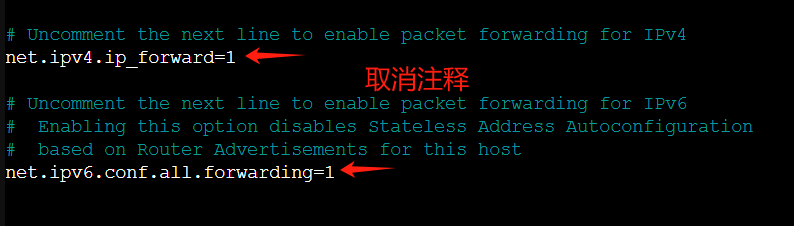
- debian12
cat << EOF > /etc/sysctl.d/99-headscale-forwarding.conf
net.ipv4.ip_forward = 1
net.ipv6.conf.all.forwarding = 1
EOF
systemctl restart systemd-sysctl
- debian13
4, install tailscale script in LXC container console
curl -fsSL https://tailscale.com/install.sh | sh
5, start tailscale service with subnet and exit mode in LXC container console
tailscale up --advertise-routes=192.168.2.0/24 --advertise-exit-node #edit 192.168.2.0 base on your local subnet setup
6, connect the tailscale admin console by the authendication output from LXC container console
7, enable subnet and exit mode in admin console

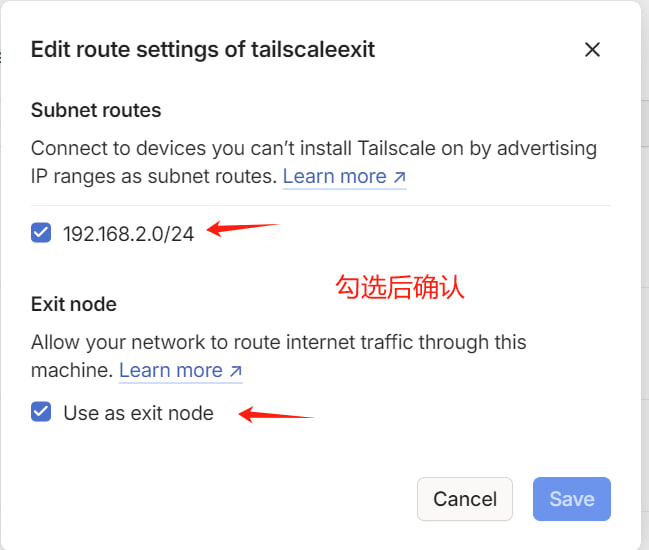
8, improve the network performance by UDP setup
apt install ethtool && networkd-dispatcher
NETDEV=$(ip -o route get 8.8.8.8 | cut -f 5 -d " ")
ethtool -K $NETDEV rx-udp-gro-forwarding on rx-gro-list off
printf '#!/bin/sh\n\nethtool -K %s rx-udp-gro-forwarding on rx-gro-list off \n' "$(ip -o route get 8.8.8.8 | cut -f 5 -d " ")" | tee /etc/networkd-dispatcher/routable.d/50-tailscale
chmod 755 /etc/networkd-dispatcher/routable.d/50-tailscale
details steps
https://tailscale.com/kb/1320/performance-best-practices#linux-optimizations-for-subnet-routers-and-exit-nodes
Done!
评论区